Transactions
This guide details how to navigate and manage your records within the Transactions List view on the mobile application:

1. Access and Primary Filtering
Access: You can enter this view by clicking the Transactions button from the main menu or by tapping the Total In-kind or Pending boxes on the home screen.
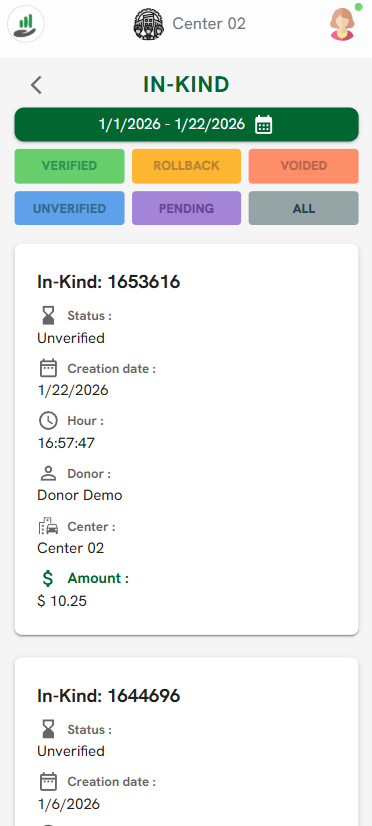
Date Filtering: Use the green calendar bar at the top to set a specific date range for the records you wish to view.
Status Filtering: Quickly narrow your list by selecting status buttons: Verified, Unverified, Pending, Rollback, Voided, or All.
2. Viewing Records
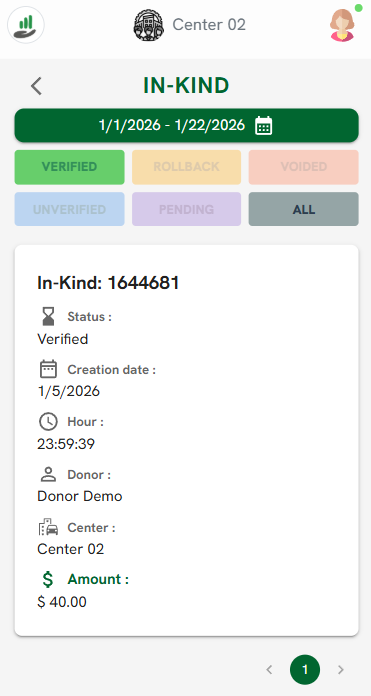
Record Summary: Each entry in the list provides immediate key information:
Transaction ID: The unique identification number for the entry.
Status: The current state of the transaction (e.g., Unverified or Verified).
Creation Date & Hour: The exact timestamp when the entry was submitted.
Donor & Center: The associated donor name and the specific center involved.
Amount: The total monetary value of the in-kind donation.
3. Transaction Details
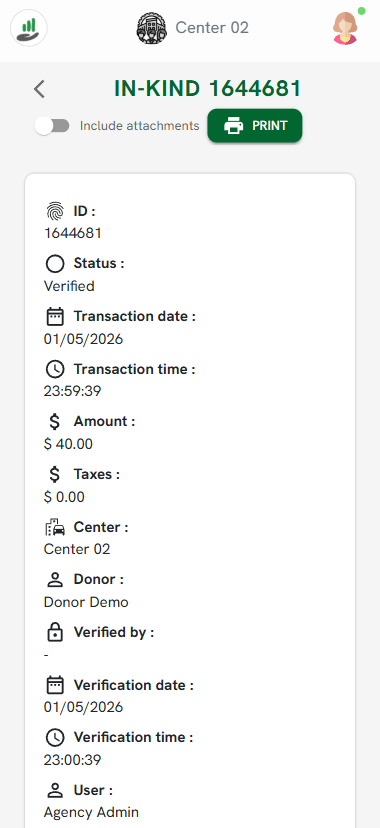
Clicking on a specific record opens an expanded detail view where you can find:
Verification Info: The date, time, and the specific User (Admin) who verified the transaction.
Financial Breakdown: A detailed look at the base amount, taxes, and final total.